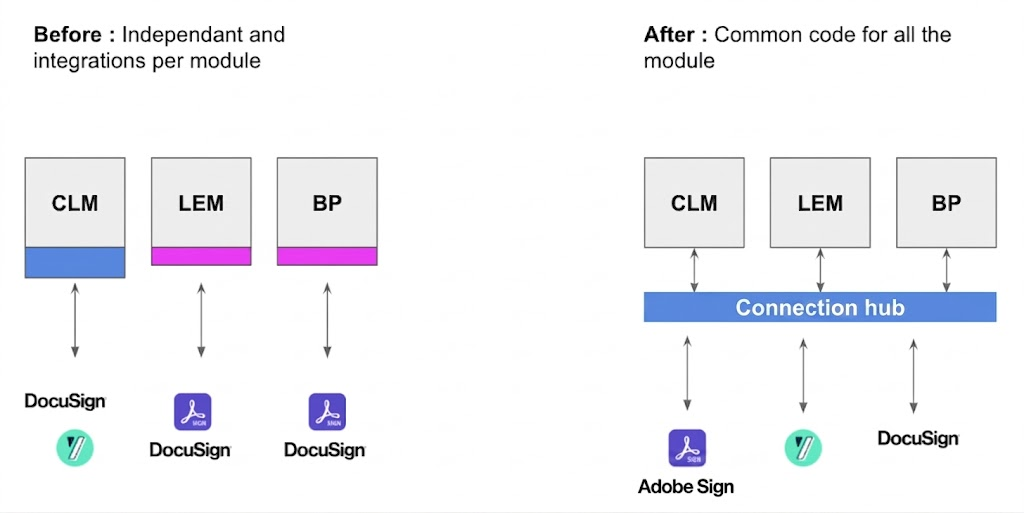
DiliTrust connects all its modules to external certified e-signature providers through a single integration layer. Instead of building a separate custom integration for each provider in each module, this hub acts as a standardized bridge: one common API that handles all communication between DiliTrust and any connected signature provider.
⭐ Why it exists
Every e-Signature provider has its own API, its own signing workflow, and its own documentation. In the past, connecting a new provider to DiliTrust meant building a full custom integration from scratch — for every module separately.
The connection hub solves this: integrate a provider once, and it becomes available across CLM, Board Portal, and LEM.
✅ How it works
When a user triggers a signature request from any DiliTrust module, the request always goes through the connection hub — regardless of which provider is configured. The hub translates DiliTrust's instructions into the provider's language, and sends back status updates, signed documents and audit trails in a standardized format.
✋ Permission required
Before connecting a signature provider, make sure the relevant permission is enabled at the tenant level. Contact your support team if it is not. Use the first if your provider is in the DiliStore list, the second if it is not.
- External electronic signatures — required if you want to use a pre-built connector (DocuSign, Adobe Sign, YouSign, etc.)
- API electronic signature — required if you want to use the generic API connector to integrate a provider not natively supported
ℹ️ You only need one of the two, depending on the provider you wish to connect.
◼ Providers and capabilities
Available providers, certification levels, authentication options and supported capabilities may vary depending on the module you use. For the full overview of how our e-signature connection hub works and how providers are connected to DiliTrust, see:
⚙️ Setup modes
Setup works differently depending on the module:
- Board Portal / LEM — How to set up or change your provider →
- CLM — How to set up or change your provider →
Quick overview:
- Board / LEM: each user connects their own provider account from the DiliStore (click your photo or initials, top right)
- CLM: a tenant admin sets up providers for the whole tenant. Up to two providers can be active simultaneously. Each user is assigned a provider; the system uses the provider of whoever initiates the signature
✍ Email customization
- CLM: email look and feel (logo, content) is managed inside the provider's interface
- Board / LEM: subject and message body can be set within DiliTrust. With the DT Signature (internal), the logo can also be customized
⚖️ Legal archiving (GoSign)
Some providers (e.g. InfoCert GoSign) require extra metadata when creating a signature request. This is handled with businessData fields (platform, module, tenant ID, custom fields), agreed with the customer and Customer Success.
⚡ API and developer resources
Connect a provider not listed in the DiliStore using the generic API connector.
Provider-specific API references:
- DocuSign — https://developers.docusign.com/docs/esign-rest-api/
- Adobe Sign — https://opensource.adobe.com/acrobat-sign/developer_guide/
- YouSign — https://developers.yousign.com/reference/
- Universign — https://apps.universign.com/docs/api/
- DropBox Sign — https://developers.hellosign.com/api/reference/
- Signaturit — https://docs.signaturit.com/api/latest
- Connective — https://documentation-archive.connective.eu/en-us/eSignatures6.2/api/
- BoxSign — https://developer.box.com/reference/resources/sign-requests
If you experience issues with your provider connection or need help configuring permissions, contact your administrator or our support team.
A well-configured provider ensures your documents are signed with the right level of security for every use case — take the time to set it up correctly from the start. ✨
Was this article helpful?
That’s Great!
Thank you for your feedback
Sorry! We couldn't be helpful
Thank you for your feedback
Feedback sent
We appreciate your effort and will try to fix the article