⭐ What is the Org Chart?
The Org Chart is a feature in DiliTrust LEM (the Entities module) that gives you a real-time visual representation of your corporate group structure.
Each entity in your group appears as a node, and the ownership relationships between entities are represented by arrows. The chart always reflects the current state of your data — no manual updates required.
✨ What is it actually for?
The Org Chart is much more than a simple diagram. It is an analytical and operational tool designed for the day-to-day needs of legal and corporate teams:
- Visualise your entire group structure at a glance, even for complex groups with hundreds of entities
- Understand who controls what using the ownership chain, which traces the direct path of control from any entity up to the top of the group
- Prepare reports for board meetings, audits or due diligence, by exporting the chart directly from the interface
- Support strategic decision-making with a clear, interactive view of the corporate hierarchy
✅ How to access the Org Chart?
- Log in to DiliTrust
- Navigate to the Entities module from the left-hand menu
- Click the Org Chart tab at the top of the screen
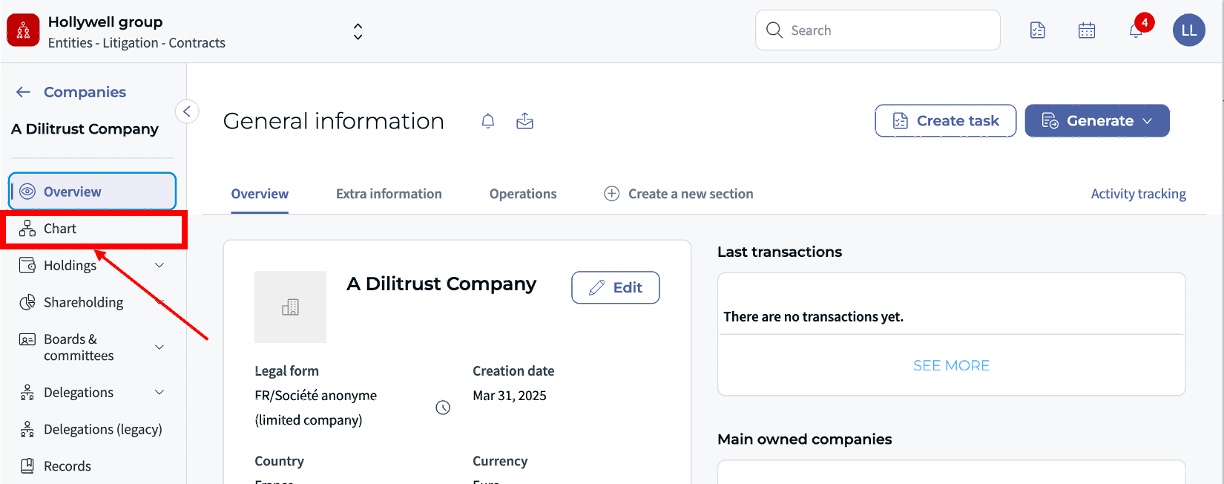
Your corporate structure loads automatically.
⏩ Go further
Ready to explore the Org Chart in depth? Each guide below covers a specific feature step by step:
- Filter the Org Chart — focus on a specific part of your group
- Display the Ownership Chain — trace the control path from any entity up to the top
- Drag & Drop and Save Views — rearrange and preserve your layout across sessions
- Export the Org Chart — download the chart with a customisable title, date and legend
✨ Good to know
Rearranging nodes via drag & drop does not modify your entity data or ownership structure — it only affects the visual layout of the chart.
Was this article helpful?
That’s Great!
Thank you for your feedback
Sorry! We couldn't be helpful
Thank you for your feedback
Feedback sent
We appreciate your effort and will try to fix the article